Excel VBAの覚え書(FileDialog、Dialogs、GetOpenFilename、GetSaveAsFilename、FindFile編)~ダイアログボックスの表示
ファイルやフォルダの指定を行う際、ダイアログボックスを表示したくなる時があります。
Excel VBAでダイアログボックスを表示する方法は色々ありますので、本稿で整理しておきたいと思います。
■ApplicationオブジェクトのFileDialogプロパティ
FileDialogプロパティの詳細
ApplicationオブジェクトのFileDialogプロパティを使用すると、Office共通のファイルダイアログボックスを表すFileDialogオブジェクトを取得することができます。
ApplicationオブジェクトのFileDialogプロパティは以下のように定義されています。
| FileDialogプロパティ(読み取り専用) | |||||||||||
| 説明 | ファイルダイアログボックスのインスタンスを表すFileDialogオブジェクトを取得 | ||||||||||
| 定義 | Property FileDialog(fileDialogType As MsoFileDialogType) As FileDialog | ||||||||||
MsoFileDialogType列挙体
FileDialogプロパティのfileDialogType引数にMsoFileDialogType列挙体でダイアログボックスの種類を指定すると、該当するFileDialogオブジェクトを取得できます。
| 名前 | 値 | ダイアログボックス | |
|---|---|---|---|
| MsoFileDialogType列挙体 | |||
| msoFileDialogFilePicker | 3 | [参照](ファイルを選択) | |
| msoFileDialogFolderPicker | 4 | [参照](フォルダを選択) | |
| msoFileDialogOpen | 1 | [ファイルを開く] | |
| msoFileDialogSaveAs | 2 | [名前を付けて保存] | |
FileDialogオブジェクトの詳細
FileDialogオブジェクトで提供されているメソッドおよびプロパティは下表の通りです。
| AllowMultiSelectプロパティ | |||||||||||
| 説明 | [ファイル]ダイアログボックスから複数ファイルを選択できるようにするかどうかを設定/取得(Trueの場合、複数選択可能) | ||||||||||
| 定義 | Property AllowMultiSelect() As Boolean | ||||||||||
| Applicationプロパティ(読み取り専用) | |||||||||||
| 説明 | オブジェクトを作成したアプリケーションを表すApplicationオブジェクトを取得 | ||||||||||
| 定義 | Property Application() As Application | ||||||||||
| ButtonNameプロパティ | |||||||||||
| 説明 | [ファイル]ダイアログボックスの動作設定ボタンに表示するテキストを設定/取得 | ||||||||||
| 定義 | Property ButtonName() As String | ||||||||||
| Creatorプロパティ(読み取り専用) | |||||||||||
| 説明 | オブジェクトを作成したアプリケーションの整数値を取得
(※)XlCreator列挙体は、以下の値のみ。 |
||||||||||
| 定義 | Property Creator() As Long | ||||||||||
| DialogTypeプロパティ(読み取り専用) | |||||||||||
| 説明 | FileDialogオブジェクトに設定されているファイルダイアログボックスの種類を取得
(※)MsoFileDialogType列挙体については、前項の表を参照。 |
||||||||||
| 定義 | Property DialogType() As MsoFileDialogType | ||||||||||
| Executeメソッド | |||||||||||
| 説明 | Showメソッドが呼び出された後にユーザのアクションを実行する | ||||||||||
| 定義 | Sub Execute() | ||||||||||
| FilterIndexプロパティ | |||||||||||
| 説明 | [ファイル]ダイアログボックスの既定のファイルフィルタを表す値を設定/取得 | ||||||||||
| 定義 | Property FilterIndex() As Integer | ||||||||||
| Filtersプロパティ(読み取り専用) | |||||||||||
| 説明 | [ファイル]ダイアログボックス内の全てのファイルフィルタを表すFileDialogFiltersコレクションを取得
(※)FileDialogFiltersコレクションについては、次項参照。 |
||||||||||
| 定義 | Property Filters() As FileDialogFilters | ||||||||||
| InitialFileNameプロパティ | |||||||||||
| 説明 | [ファイル]ダイアログボックスに最初に表示するパスまたはファイル名を設定/取得 | ||||||||||
| 定義 | Property InitialFileName() As String | ||||||||||
| InitialViewプロパティ | |||||||||||
| 説明 | [ファイル]ダイアログボックス内のファイルとフォルダの最初の表示方法を設定/取得 | ||||||||||
| 定義 | Property InitialView() As MsoFileDialogView | ||||||||||
| Itemプロパティ(既定)(読み取り専用) | |||||||||||
| 説明 | 指定したオブジェクトに関連付けられたテキストを取得 | ||||||||||
| 定義 | Property Item() As String | ||||||||||
| Parentプロパティ(読み取り専用) | |||||||||||
| 説明 | 指定したオブジェクトの親オブジェクトを取得 | ||||||||||
| 定義 | Property Parent() As Object | ||||||||||
| SelectedItemsプロパティ(読み取り専用) | |||||||||||
| 説明 | [ファイル]ダイアログボックスからユーザが選択した、全てのファイルまたはフォルダのパスを表すFileDialogSelectedItemsコレクションを取得 | ||||||||||
| 定義 | Property SelectedItems() As FileDialogSelectedItems | ||||||||||
| Showメソッド | |||||||||||
| 説明 | [ファイル]ダイアログボックスを表示し、ユーザが[アクション]ボタン(-1)を押したのか、または[キャンセル]ボタン(0)を押したのかを示す値を返す | ||||||||||
| 定義 | Function Show() As Integer | ||||||||||
| Titleプロパティ | |||||||||||
| 説明 | [ファイル]ダイアログボックスで表示するタイトルを設定/取得 | ||||||||||
| 定義 | Property Title() As String | ||||||||||
MsoFileDialogView列挙体
FileDialogオブジェクトのInitialViewプロパティにMsoFileDialogView列挙体でプレゼンテーションを指定すると、ダイアログボックスの表示方法を変更することができます。
| 名前 | 値 | プレゼンテーション | |
|---|---|---|---|
| MsoFileDialogView列挙体 | |||
| msoFileDialogViewDetails | 2 | ファイルはリスト形式で詳細情報と共に表示 | |
| msoFileDialogViewLargeIcons | 6 | ファイルは大きいアイコンで表示 | |
| msoFileDialogViewList | 1 | ファイルはリスト形式で詳細なしで表示 | |
| msoFileDialogViewPreview | 4 | ファイルは選択したファイルを示すプレビューウィンドウと共に表示 | |
| msoFileDialogViewProperties | 3 | ファイルはリスト形式でプロパティを示すウィンドウと共に表示 | |
| msoFileDialogViewSmallIcons | 7 | ファイルは小さいアイコンで表示 | |
| msoFileDialogViewThumbnail | 5 | ファイルは縮小表示で表示 | |
| msoFileDialogViewTiles | 9 | ファイルは並べられたアイコンで表示 | |
| msoFileDialogViewWebView | 8 | Webビューに表示されるファイル | |
FileDialogFiltersコレクションの詳細
FileDialogオブジェクトのFiltersプロパティを使用すると、FileDialogFiltersコレクションを取得することができます。
FileDialogFiltersコレクションで提供されているメソッドおよびプロパティは下表の通りです。
| Addメソッド | |||||||||||
| 説明 | [ファイル]ダイアログボックスの[ファイルの種類]ドロップダウンリストのフィルタの一覧に新しいファイルフィルタを追加する | ||||||||||
| 定義 | Function Add(Description As String, Extensions As String, [Position As Variant]) As FileDialogFilter | ||||||||||
| Applicationプロパティ(読み取り専用) | |||||||||||
| 説明 | オブジェクトを作成したアプリケーションを表すApplicationオブジェクトを取得 | ||||||||||
| 定義 | Property Application() As Application | ||||||||||
| Clearメソッド | |||||||||||
| 説明 | [ファイル]ダイアログボックスに現在適用されているすべてのフィルタを削除する | ||||||||||
| 定義 | Sub Clear() | ||||||||||
| Countプロパティ(読み取り専用) | |||||||||||
| 説明 | コレクションに含まれるオブジェクトの数を取得 | ||||||||||
| 定義 | Property Count() As Long | ||||||||||
| Creatorプロパティ(読み取り専用) | |||||||||||
| 説明 | オブジェクトを作成したアプリケーションの整数値を取得
(※)XlCreator列挙体は、以下の値のみ。 |
||||||||||
| 定義 | Property Creator() As Long | ||||||||||
| Deleteメソッド | |||||||||||
| 説明 | [ファイル]ダイアログボックスのフィルタを削除する | ||||||||||
| 定義 | Sub Delete([filter As Variant]) | ||||||||||
| Itemメソッド | |||||||||||
| 説明 | コレクションから単一のオブジェクトを取得 | ||||||||||
| 定義 | Function Item(Index As Integer) As FileDialogFilter | ||||||||||
| Parentプロパティ(読み取り専用) | |||||||||||
| 説明 | 指定されたオブジェクトの親オブジェクトを取得 | ||||||||||
| 定義 | Property Parent() As Object | ||||||||||
FileDialogFilterオブジェクトの詳細
FileDialogFiltersコレクションのItemメソッドを使用すると、FileDialogFilterオブジェクトを取得することができます。
FileDialogFilterオブジェクトで提供されているプロパティは下表の通りです(メソッドはありません)。
| Applicationプロパティ(読み取り専用) | |||||||||||
| 説明 | オブジェクトを作成したアプリケーションを表すApplicationオブジェクトを取得 | ||||||||||
| 定義 | Property Application() As Application | ||||||||||
| Creatorプロパティ(読み取り専用) | |||||||||||
| 説明 | オブジェクトを作成したアプリケーションの整数値を取得
(※)XlCreator列挙体は、以下の値のみ。 |
||||||||||
| 定義 | Property Creator() As Long | ||||||||||
| Descriptionプロパティ(読み取り専用) | |||||||||||
| 説明 | [ファイル]ダイアログボックスに表示するフィルタの説明を取得する | ||||||||||
| 定義 | Property Description() As String | ||||||||||
| Extensionsプロパティ(読み取り専用) | |||||||||||
| 説明 | [ファイル]ダイアログボックスに表示するフィルタのk拡張子を取得する | ||||||||||
| 定義 | Property Extensions() As String | ||||||||||
| Parentプロパティ(読み取り専用) | |||||||||||
| 説明 | 指定されたオブジェクトの親オブジェクトを取得 | ||||||||||
| 定義 | Property Parent() As Object | ||||||||||
FileDialogSelectedItemsコレクションの詳細
FileDialogオブジェクトのSelectedItemsプロパティを使用すると、FileDialogSelectedItemsコレクションを取得することができます。
FileDialogSelectedItemsコレクションで提供されているメソッドおよびプロパティは下表の通りです。
| Applicationプロパティ(読み取り専用) | |||||||||||
| 説明 | オブジェクトを作成したアプリケーションを表すApplicationオブジェクトを取得 | ||||||||||
| 定義 | Property Application() As Application | ||||||||||
| Countプロパティ(読み取り専用) | |||||||||||
| 説明 | コレクションに含まれるオブジェクトの数を取得 | ||||||||||
| 定義 | Property Count() As Long | ||||||||||
| Creatorプロパティ(読み取り専用) | |||||||||||
| 説明 | オブジェクトを作成したアプリケーションの整数値を取得
(※)XlCreator列挙体は、以下の値のみ。 |
||||||||||
| 定義 | Property Creator() As Long | ||||||||||
| Itemメソッド | |||||||||||
| 説明 | コレクションからファイルの1つのパスに対応する文字列を取得 | ||||||||||
| 定義 | Function Item(Index As Integer) As String | ||||||||||
| Parentプロパティ(読み取り専用) | |||||||||||
| 説明 | 指定されたオブジェクトの親オブジェクトを取得 | ||||||||||
| 定義 | Property Parent() As Object | ||||||||||
FileDialogプロパティの使用例(1)
以下のプログラムを実行すると、4種類のダイアログボックスが順に表示されます。
(サンプル・プログラム)
- Dim fd As FileDialog
- Private Sub Sample1()
- Set fd = Application.FileDialog(msoFileDialogFilePicker)
- fd.Show
- Set fd = Application.FileDialog(msoFileDialogFolderPicker)
- fd.Show
- Set fd = Application.FileDialog(msoFileDialogOpen)
- fd.Show
- Set fd = Application.FileDialog(msoFileDialogSaveAs)
- fd.Show
- End Sub
(実行結果)
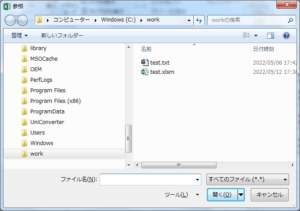
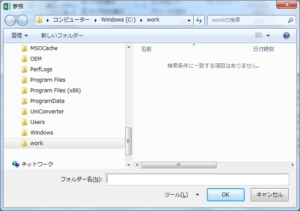
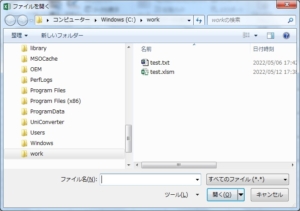
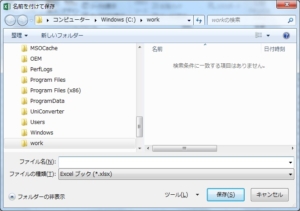
FileDialogプロパティの使用例(2)
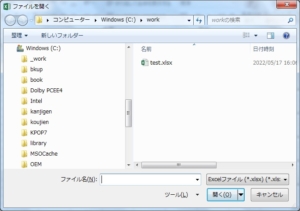
以下のプログラムを実行すると、[ファイルを開く]ダイアログボックスにExcelファイルのみが表示されます。
ここでファイルを選択すると、ファイル名のフルパスを取得し、指定したファイルを開きます。
(サンプル・プログラム)
- Dim fd As FileDialog
- Dim filename As String
- Private Sub Sample2()
- Set fd = Application.FileDialog(msoFileDialogOpen)
- fd.Filters.Clear
- fd.Filters.Add “Excelファイル (*.xlsx)", “*.xlsx"
- If fd.Show = True Then
- filename = fd.SelectedItems(1)
- fd.Execute
- End If
- End Sub
(実行結果)
■ApplicationオブジェクトのDialogsプロパティ
Dialogsプロパティの詳細
ApplicationオブジェクトのDialogsプロパティを使用すると、Excelに組み込まれた全てのダイアログボックスを表すDialogsコレクションを取得することができます。
Dialogsプロパティは以下のように定義されています。
| Dialogsプロパティ(読み取り専用) | |||||||||||
| 説明 | 全ての組み込みダイアログボックスを表すDialogsコレクションを取得 | ||||||||||
| 定義 | Property Dialogs() As Dialogs | ||||||||||
Dialogsコレクションの詳細
Dialogsコレクションで提供されているプロパティは下表の通りです(メソッドはありません)。
| Applicationプロパティ(読み取り専用) | |||||||||||
| 説明 | オブジェクトを作成したアプリケーションを表すApplicationオブジェクトを取得 | ||||||||||
| 定義 | Property Application() As Application | ||||||||||
| Countプロパティ(読み取り専用) | |||||||||||
| 説明 | コレクションに含まれるオブジェクトの数を取得 | ||||||||||
| 定義 | Property Count() As Long | ||||||||||
| Creatorプロパティ(読み取り専用) | |||||||||||
| 説明 | オブジェクトを作成したアプリケーションの整数値を取得
(※)XlCreator列挙体は、以下の値のみ。 |
||||||||||
| 定義 | Property Creator() As XlCreator | ||||||||||
| Itemプロパティ(読み取り専用)(既定) | |||||||||||
| 説明 | コレクションから単一のオブジェクトを取得
(※)XlBuiltInDialog列挙体については、次項参照。 |
||||||||||
| 定義 | Property Item(Index As XlBuiltInDialog) As Dialog | ||||||||||
| Parentプロパティ(読み取り専用) | |||||||||||
| 説明 | 指定されたオブジェクトの親オブジェクトを取得 | ||||||||||
| 定義 | Property Parent() As Object | ||||||||||
XlBuiltInDialog列挙体
DialogsコレクションのItemプロパティにXlBuiltInDialog列挙体でダイアログボックスの種類を指定すると、該当するDialogオブジェクトを取得できます。
Itemプロパティは既定のプロパティになっているため、「Dialogs.Item(Index)」と記述する代りに「Dialogs(Index)」と記述することで、指定したDialogオブジェクトを取得することができます。
| 名前 | 値 | ダイアログボックス | |
|---|---|---|---|
| XlBuiltInDialog列挙体 | |||
| xlDialogActivate | 103 | [ウィンドウの選択] | |
| xlDialogActiveCellFont | 476 | [セルの書式設定 (フォント)] | |
| xlDialogAddChartAutoformat | 390 | [ユーザー設定のグラフ種類の追加] | |
| xlDialogAddinManager | 321 | [アドイン] | |
| xlDialogAlignment | 43 | [セルの書式設定 (配置)] | |
| xlDialogApplyNames | 133 | [名前の引用] | |
| xlDialogApplyStyle | 212 | [スタイル] | |
| xlDialogAppMove | 170 | [移動 (アプリケーション)] | |
| xlDialogAppSize | 171 | [送信] | |
| xlDialogArrangeAll | 12 | [ウィンドウの整列] | |
| xlDialogAssignToObject | 213 | [オブジェクトへの登録] | |
| xlDialogAssignToTool | 293 | [ツールに割り当て] | |
| xlDialogAttachText | 80 | [文字の追加] | |
| xlDialogAttachToolbars | 323 | [ブックへのツールバーの登録] | |
| xlDialogAutoCorrect | 485 | [オートコレクト] | |
| xlDialogAxes | 78 | [軸] | |
| xlDialogBorder | 45 | [セルの書式設定 (罫線)] | |
| xlDialogCalculation | 32 | [計算方法の設定] | |
| xlDialogCellProtection | 46 | [セルの書式設定 (保護)] | |
| xlDialogChangeLink | 166 | [リンクの変更] | |
| xlDialogChartAddData | 392 | [グラフ追加データ] | |
| xlDialogChartLocation | 527 | [グラフの場所] | |
| xlDialogChartOptionsDataLabelMultiple | 724 | [グラフ オプション データ ラベル複数] | |
| xlDialogChartOptionsDataLabels | 505 | [グラフ オプション データ ラベル] | |
| xlDialogChartOptionsDataTable | 506 | [グラフ オプション データ テーブル] | |
| xlDialogChartSourceData | 540 | [グラフの元データ] | |
| xlDialogChartTrend | 350 | [グラフ トレンド] | |
| xlDialogChartType | 526 | [グラフの種類] | |
| xlDialogChartWizard | 288 | [グラフ ウィザード] | |
| xlDialogCheckboxProperties | 435 | [チェック ボックスのプロパティ] | |
| xlDialogClear | 52 | [消去] | |
| xlDialogColorPalette | 161 | [オプション (色)] | |
| xlDialogColumnWidth | 47 | [列幅] | |
| xlDialogCombination | 73 | [複合] | |
| xlDialogConditionalFormatting | 583 | [条件付き書式の設定] | |
| xlDialogConsolidate | 191 | [統合の設定] | |
| xlDialogCopyChart | 147 | [グラフのコピー] | |
| xlDialogCopyPicture | 108 | [図のコピー] | |
| xlDialogCreateList | 796 | [リストの作成] | |
| xlDialogCreateNames | 62 | [名前の作成] | |
| xlDialogCreatePublisher | 217 | [発行側の作成] | |
| xlDialogCreateRelationship | 1272 | [リレーションシップの作成] | |
| xlDialogCustomizeToolbar | 276 | [ユーザー設定 (オプション)] | |
| xlDialogCustomViews | 493 | [ユーザー設定のビュー] | |
| xlDialogDataDelete | 36 | [データの削除] | |
| xlDialogDataLabel | 379 | [データ ラベル] | |
| xlDialogDataLabelMultiple | 723 | [データ ラベル複数] | |
| xlDialogDataSeries | 40 | [連続データ] | |
| xlDialogDataValidation | 525 | [データの入力規則 (設定)] | |
| xlDialogDefineName | 61 | [名前の定義] | |
| xlDialogDefineStyle | 229 | [スタイル] | |
| xlDialogDeleteFormat | 111 | [セルの書式設定 (表示形式)] | |
| xlDialogDeleteName | 110 | [名前の定義] | |
| xlDialogDemote | 203 | [グループ化] | |
| xlDialogDisplay | 27 | [画面設定] | |
| xlDialogDocumentInspector | 862 | [ドキュメント検査] | |
| xlDialogEditboxProperties | 438 | [編集ボックスのプロパティ] | |
| xlDialogEditColor | 223 | [色の編集] | |
| xlDialogEditDelete | 54 | [削除] | |
| xlDialogEditionOptions | 251 | [エディション オプション] | |
| xlDialogEditSeries | 228 | [系列の編集] | |
| xlDialogErrorbarX | 463 | [Errorbar X] | |
| xlDialogErrorbarY | 464 | [Errorbar Y] | |
| xlDialogErrorChecking | 732 | [エラー チェック] | |
| xlDialogEvaluateFormula | 709 | [数式の検証] | |
| xlDialogExternalDataProperties | 530 | [外部データのプロパティ] | |
| xlDialogExtract | 35 | [抽出] | |
| xlDialogFileDelete | 6 | [ファイルの削除] | |
| xlDialogFileSharing | 481 | [ブックの共有 (編集)] | |
| xlDialogFillGroup | 200 | [グループの入力] | |
| xlDialogFillWorkgroup | 301 | [ワークグループの入力] | |
| xlDialogFilter | 447 | [オートフィルター] | |
| xlDialogFilterAdvanced | 370 | [フィルター オプションの設定] | |
| xlDialogFindFile | 475 | [ファイルを開く] | |
| xlDialogFont | 26 | [フォントの設定] | |
| xlDialogFontProperties | 381 | [セルの書式設定 (フォント)] | |
| xlDialogFormatAuto | 269 | [オートフォーマット] | |
| xlDialogFormatChart | 465 | [グラフの書式設定] | |
| xlDialogFormatCharttype | 423 | [グラフの種類] | |
| xlDialogFormatFont | 150 | [フォントの設定] | |
| xlDialogFormatLegend | 88 | [凡例の書式設定] | |
| xlDialogFormatMain | 225 | [メイングラフ/重ね合わせグラフ] | |
| xlDialogFormatMove | 128 | [移動の書式設定] | |
| xlDialogFormatNumber | 42 | [セルの書式設定 (表示形式)] | |
| xlDialogFormatOverlay | 226 | [重ね合わせグラフの設定] | |
| xlDialogFormatSize | 129 | [サイズの書式設定] | |
| xlDialogFormatText | 89 | [文字書式] | |
| xlDialogFormulaFind | 64 | [検索] | |
| xlDialogFormulaGoto | 63 | [ジャンプ] | |
| xlDialogFormulaReplace | 130 | [置換] | |
| xlDialogFunctionWizard | 450 | [関数の挿入] | |
| xlDialogGallery3dArea | 193 | [オートフォーマット (3-D 面)] | |
| xlDialogGallery3dBar | 272 | [オートフォーマット (横棒)] | |
| xlDialogGallery3dColumn | 194 | [オートフォーマット (3-D 縦棒)] | |
| xlDialogGallery3dLine | 195 | [オートフォーマット (3-D 折れ線)] | |
| xlDialogGallery3dPie | 196 | [オートフォーマット (3-D 円)] | |
| xlDialogGallery3dSurface | 273 | [オートフォーマット (等高線)] | |
| xlDialogGalleryArea | 67 | [オートフォーマット (面)] | |
| xlDialogGalleryBar | 68 | [オートフォーマット (横棒)] | |
| xlDialogGalleryColumn | 69 | [オートフォーマット (縦棒)] | |
| xlDialogGalleryCustom | 388 | [オートフォーマット (フォーマットの種類)] | |
| xlDialogGalleryDoughnut | 344 | [オートフォーマット (ドーナッツ)] | |
| xlDialogGalleryLine | 70 | [オートフォーマット (折れ線)] | |
| xlDialogGalleryPie | 71 | [オートフォーマット (円)] | |
| xlDialogGalleryRadar | 249 | [オートフォーマット (レーダー)] | |
| xlDialogGalleryScatter | 72 | [オートフォーマット (散布図)] | |
| xlDialogGoalSeek | 198 | [ゴール シーク] | |
| xlDialogGridlines | 76 | [グラフ オプション (目盛線)] | |
| xlDialogImportTextFile | 666 | [テキスト ファイルのインポート] | |
| xlDialogInsert | 55 | [セルの挿入] | |
| xlDialogInsertHyperlink | 596 | [ハイパーリンクの挿入] | |
| xlDialogInsertNameLabel | 496 | [名前 (ラベル範囲)] | |
| xlDialogInsertObject | 259 | [オブジェクトの挿入 (新規作成)] | |
| xlDialogInsertPicture | 342 | [図の挿入] | |
| xlDialogInsertTitle | 380 | [タイトル/軸ラベルの挿入] | |
| xlDialogLabelProperties | 436 | [ラベルのプロパティ] | |
| xlDialogListboxProperties | 437 | [リスト ボックスのプロパティ] | |
| xlDialogMacroOptions | 382 | [マクロ オプション] | |
| xlDialogMailEditMailer | 470 | [メール編集メーラー] | |
| xlDialogMailLogon | 339 | [回覧先] | |
| xlDialogMailNextLetter | 378 | [次の手紙の送信] | |
| xlDialogMainChart | 85 | [メイン グラフ] | |
| xlDialogMainChartType | 185 | [メイン グラフの種類] | |
| xlDialogManageRelationships | 1271 | [リレーションシップの管理] | |
| xlDialogMenuEditor | 322 | [メニュー エディター] | |
| xlDialogMove | 262 | [移動] | |
| xlDialogMyPermission | 834 | [アクセス許可] | |
| xlDialogNameManager | 977 | [名前の管理] | |
| xlDialogNew | 119 | [新規作成 (標準)] | |
| xlDialogNewName | 978 | [新しい名前] | |
| xlDialogNewWebQuery | 667 | [新しい Web クエリ] | |
| xlDialogNote | 154 | [コメントの挿入] | |
| xlDialogObjectProperties | 207 | [オブジェクトのプロパティ] | |
| xlDialogObjectProtection | 214 | [オブジェクトの保護] | |
| xlDialogOpen | 1 | [ファイルを開く] | |
| xlDialogOpenLinks | 2 | [リンク元を開く] | |
| xlDialogOpenMail | 188 | [メールを開く] | |
| xlDialogOpenText | 441 | [テキストを開く] | |
| xlDialogOptionsCalculation | 318 | [オプション (計算方法)] | |
| xlDialogOptionsChart | 325 | [オプション (グラフ)] | |
| xlDialogOptionsEdit | 319 | [オプション (編集)] | |
| xlDialogOptionsGeneral | 356 | [オプション (全般)] | |
| xlDialogOptionsListsAdd | 458 | [オプション (ユーザー設定リスト)] | |
| xlDialogOptionsME | 647 | [オプション (インターナショナル)] | |
| xlDialogOptionsTransition | 355 | [オプション (移行)] | |
| xlDialogOptionsView | 320 | [オプション (表示)] | |
| xlDialogOutline | 142 | [設定] | |
| xlDialogOverlay | 86 | [重ね合わせグラフ] | |
| xlDialogOverlayChartType | 186 | [グラフの種類の重ね合わせ] | |
| xlDialogPageSetup | 7 | [ページ設定 (ページ)] | |
| xlDialogParse | 91 | [区切り位置] | |
| xlDialogPasteNames | 58 | [名前の貼り付け] | |
| xlDialogPasteSpecial | 53 | [形式を選択して貼り付け] | |
| xlDialogPatterns | 84 | [セルの書式設定 (パターン)] | |
| xlDialogPermission | 832 | [アクセス許可] | |
| xlDialogPhonetic | 656 | [ふりがなの設定 (ふりがな)] | |
| xlDialogPivotCalculatedField | 570 | [ピボット集計フィールド] | |
| xlDialogPivotCalculatedItem | 572 | [ピボット集計アイテム] | |
| xlDialogPivotClientServerSet | 689 | [ピボット クライアント サーバー セット] | |
| xlDialogPivotFieldGroup | 433 | [ピボット フィールド グループ] | |
| xlDialogPivotFieldProperties | 313 | [ピボット フィールド プロパティ] | |
| xlDialogPivotFieldUngroup | 434 | [ピボット フィールド グループ解除] | |
| xlDialogPivotShowPages | 421 | [ピボット表示ページ] | |
| xlDialogPivotSolveOrder | 568 | [ピボット解決順序] | |
| xlDialogPivotTableOptions | 567 | [ピボットテーブル オプション] | |
| xlDialogPivotTableSlicerConnections | 1183 | [ピボットテーブル スライサー接続] | |
| xlDialogPivotTableWhatIfAnalysisSettings | 1153 | [What If Analysis 設定] | |
| xlDialogPivotTableWizard | 312 | [ピボットテーブル ウィザード] | |
| xlDialogPlacement | 300 | [表示位置] | |
| xlDialogPrint | 8 | [印刷] | |
| xlDialogPrinterSetup | 9 | [プリンターの設定] | |
| xlDialogPrintPreview | 222 | [印刷プレビュー] | |
| xlDialogPromote | 202 | [グループの解除] | |
| xlDialogProperties | 474 | [プロパティ (ファイルの概要)] | |
| xlDialogPropertyFields | 754 | [プロパティ フィールド] | |
| xlDialogProtectDocument | 28 | [シートの保護] | |
| xlDialogProtectSharing | 620 | [共有ブックの保護] | |
| xlDialogPublishAsWebPage | 653 | [Web ページとして発行] | |
| xlDialogPushbuttonProperties | 445 | [プッシュ ボタンのプロパティ] | |
| xlDialogRecommendedPivotTables | 1258 | [おすすめピボットテーブル] | |
| xlDialogReplaceFont | 134 | [フォントの設定] | |
| xlDialogRoutingSlip | 336 | [回覧先](使用不可) | |
| xlDialogRowHeight | 127 | [行の高さ] | |
| xlDialogRun | 17 | [マクロ] | |
| xlDialogSaveAs | 5 | [名前を付けて保存] | |
| xlDialogSaveCopyAs | 456 | [コピーを名前を付けて保存] | |
| xlDialogSaveNewObject | 208 | [新しいオブジェクトの保存] | |
| xlDialogSaveWorkbook | 145 | [名前を付けて保存] | |
| xlDialogSaveWorkspace | 285 | [作業状態の保存] | |
| xlDialogScale | 87 | [倍率] | |
| xlDialogScenarioAdd | 307 | [シナリオの追加] | |
| xlDialogScenarioCells | 305 | [シナリオの登録と管理] | |
| xlDialogScenarioEdit | 308 | [シナリオの追加] | |
| xlDialogScenarioMerge | 473 | [シナリオのコピー] | |
| xlDialogScenarioSummary | 311 | [シナリオの情報] | |
| xlDialogScrollbarProperties | 420 | [スクロール バーのプロパティ] | |
| xlDialogSearch | 731 | [通常のファイル検索] | |
| xlDialogSelectSpecial | 132 | [選択オプション] | |
| xlDialogSendMail | 189 | [メッセージ (HTML 形式)] | |
| xlDialogSeriesAxes | 460 | [系列軸] | |
| xlDialogSeriesOptions | 557 | [系列オプション] | |
| xlDialogSeriesOrder | 466 | [系列の順序] | |
| xlDialogSeriesShape | 504 | [系列の形状] | |
| xlDialogSeriesX | 461 | [系列 X] | |
| xlDialogSeriesY | 462 | [データ系列の書式設定 (名前/値)] | |
| xlDialogSetBackgroundPicture | 509 | [シートの背景] | |
| xlDialogSetManager | 1109 | [セットの管理] | |
| xlDialogSetMDXEditor | 1208 | [MDX エディターの設定] | |
| xlDialogSetPrintTitles | 23 | [印刷タイトルの設定] | |
| xlDialogSetTupleEditorOnColumns | 1108 | [列での Tuple エディターの設定] | |
| xlDialogSetTupleEditorOnRows | 1107 | [行での Tuple エディターの設定] | |
| xlDialogSetUpdateStatus | 159 | [更新状態の設定] | |
| xlDialogShowDetail | 204 | [詳細データの表示] | |
| xlDialogShowToolbar | 220 | [ユーザー設定 (オプション)] | |
| xlDialogSize | 261 | [サイズ] | |
| xlDialogSlicerCreation | 1182 | [スライサー作成] | |
| xlDialogSlicerPivotTableConnections | 1184 | [スライサー ピボットテーブル接続] | |
| xlDialogSlicerSettings | 1179 | [スライサーの設定] | |
| xlDialogSort | 39 | [並べ替え] | |
| xlDialogSortSpecial | 192 | [並べ替え] | |
| xlDialogSparklineInsertColumn | 1134 | [スパークラインの縦棒の挿入] | |
| xlDialogSparklineInsertLine | 1133 | [スパークラインの折れ線の挿入] | |
| xlDialogSparklineInsertWinLoss | 1135 | [スパークラインの勝敗の挿入] | |
| xlDialogSplit | 137 | [列の分割、行の分割] | |
| xlDialogStandardFont | 190 | [フォントの設定] | |
| xlDialogStandardWidth | 472 | [標準の幅] | |
| xlDialogStyle | 44 | [フォントの設定] | |
| xlDialogSubscribeTo | 218 | [引用] | |
| xlDialogSubtotalCreate | 398 | [集計の設定] | |
| xlDialogSummaryInfo | 474 | [プロパティ (ファイルの概要)] | |
| xlDialogTable | 41 | [テーブル] | |
| xlDialogTabOrder | 394 | [タブ オーダーの設定] | |
| xlDialogTextToColumns | 422 | [区切り位置] | |
| xlDialogUnhide | 94 | [ウィンドウの再表示] | |
| xlDialogUpdateLink | 201 | [リンクの更新] | |
| xlDialogVbaInsertFile | 328 | [VBA 挿入ファイル] | |
| xlDialogVbaMakeAddin | 478 | [VBA 作成アドイン] | |
| xlDialogVbaProcedureDefinition | 330 | [VBA 手順定義] | |
| xlDialogView3d | 197 | [3D 表示] | |
| xlDialogWebOptionsBrowsers | 773 | [Web オプション (ブラウザー)] | |
| xlDialogWebOptionsEncoding | 686 | [Web オプション (エンコード)] | |
| xlDialogWebOptionsFiles | 684 | [Web オプション (ファイル)] | |
| xlDialogWebOptionsFonts | 687 | [Web オプション (フォント)] | |
| xlDialogWebOptionsGeneral | 683 | [Web オプション (全般)] | |
| xlDialogWebOptionsPictures | 685 | [Web オプション (図)] | |
| xlDialogWindowMove | 14 | [ウィンドウの移動] | |
| xlDialogWindowSize | 13 | [ウィンドウ サイズ] | |
| xlDialogWorkbookAdd | 281 | [シートの移動またはコピー] | |
| xlDialogWorkbookCopy | 283 | [シートの移動またはコピー] | |
| xlDialogWorkbookInsert | 354 | [挿入 (標準)] | |
| xlDialogWorkbookMove | 282 | [シートの移動またはコピー] | |
| xlDialogWorkbookName | 386 | [シート名の変更] | |
| xlDialogWorkbookNew | 302 | [挿入 (標準)] | |
| xlDialogWorkbookOptions | 284 | [シート名の変更] | |
| xlDialogWorkbookProtect | 417 | [ブックの保護] | |
| xlDialogWorkbookTabSplit | 415 | [ブックのタブ分割] | |
| xlDialogWorkbookUnhide | 384 | [再表示] | |
| xlDialogWorkgroup | 199 | [グループ編集] | |
| xlDialogWorkspace | 95 | [作業状態設定] | |
| xlDialogZoom | 256 | [ズーム] | |
Dialogオブジェクトの詳細
DialogsコレクションのItemプロパティを使用すると、Dialogオブジェクトを取得することができます。
Dialogオブジェクトで提供されているメソッドおよびプロパティは下表の通りです。
| Applicationプロパティ(読み取り専用) | |||||||||||
| 説明 | オブジェクトを作成したアプリケーションを表すApplicationオブジェクトを取得 | ||||||||||
| 定義 | Property Application() As Application | ||||||||||
| Creatorプロパティ(読み取り専用) | |||||||||||
| 説明 | オブジェクトを作成したアプリケーションの整数値を取得
(※)XlCreator列挙体は、以下の値のみ。 |
||||||||||
| 定義 | Property Creator() As XlCreator | ||||||||||
| Parentプロパティ(読み取り専用) | |||||||||||
| 説明 | 指定されたオブジェクトの親オブジェクトを取得 | ||||||||||
| 定義 | Property Parent() As Object | ||||||||||
| Showメソッド | |||||||||||
| 説明 | 組み込みダイアログボックスを表示し、ユーザが[OK]ボタン(True)を押したのか、または[キャンセル]ボタン(False)を押したのかを示す値を返す
(※)各ダイアログボックスの引数については、Microsoftのサイト(組み込みダイアログ ボックス引数一覧)を参照。 |
||||||||||
| 定義 | Function Show([Arg1 As Variant], [Arg2 As Variant], [Arg3 As Variant], [Arg4 As Variant], [Arg5 As Variant], [Arg6 As Variant], [Arg7 As Variant], [Arg8 As Variant], [Arg9 As Variant], [Arg10 As Variant], [Arg11 As Variant], [Arg12 As Variant], [Arg13 As Variant], [Arg14 As Variant], [Arg15 As Variant], [Arg16 As Variant], [Arg17 As Variant], [Arg18 As Variant], [Arg19 As Variant], [Arg20 As Variant], [Arg21 As Variant], [Arg22 As Variant], [Arg23 As Variant], [Arg24 As Variant], [Arg25 As Variant], [Arg26 As Variant], [Arg27 As Variant], [Arg28 As Variant], [Arg29 As Variant], [Arg30 As Variant]) As Boolean | ||||||||||
Dialogsプロパティの使用例
「xlDialogOpen」を指定した場合、Showメソッドの引数は下表の通りです。
| 引数 | 内容 |
|---|---|
| Arg1 | file_text |
| Arg2 | update_links |
| Arg3 | read_only |
| Arg4 | format |
| Arg5 | prot_pwd |
| Arg7 | ignore_rorec |
| Arg8 | file_origin |
| Arg9 | custom_delimit |
| Arg10 | add_logical |
| Arg11 | editable |
| Arg12 | file_access |
| Arg13 | notify_logical |
| Arg14 | converter |
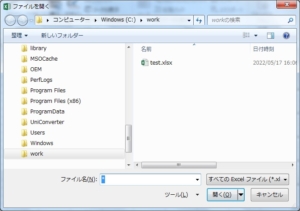
以下のプログラムを実行すると、[ファイルを開く]ダイアログボックスにExcelファイルのみが表示されます。
ここでファイルを選択すると、指定したファイルを開きます。
(サンプル・プログラム)
- Private Sub Sample3()
- Application.dialogs(xlDialogOpen).Show (“*.xlsx")
- End Sub
(実行結果)
■ApplicationオブジェクトのGetOpenFilenameメソッド
ApplicationオブジェクトのGetOpenFilenameメソッドを使用すると、[ファイルを開く]ダイアログボックスを表示することができます。
GetOpenFilenameメソッドの詳細
GetOpenFilenameメソッドは以下のように定義されています。
| GetOpenFilenameメソッド | |||||||||||
| 説明 | [ファイルを開く]ダイアログボックスを表示する | ||||||||||
| 定義 | Function GetOpenFilename([FileFilter As Variant], [FilterIndex As Variant = 1], [Title As Variant], [ButtonText As Variant], [MultiSelect As Variant = False]) As Variant | ||||||||||
GetOpenFilenameメソッドの引数は下表の通りです。
| 引数 | 説明 |
|---|---|
| FileFilter | ファイルフィルタ文字列を指定 |
| FilterIndex | ファイルフィルタ文字列の中で、何番目の値を既定値とするかを指定 |
| Title | タイトルを指定(省略時は"ファイルを開く") |
| ButtonText | ボタンのテキストを指定(Macintoshのみ) |
| MultiSelect | 複数ファイルの選択を可能とする場合、Trueを指定 |
戻り値は、ファイルが選択された場合はファイル名のフルパス(複数選択時は配列)、ダイアログボックスをキャンセルした場合はFalseです。
GetOpenFilenameメソッドの使用例
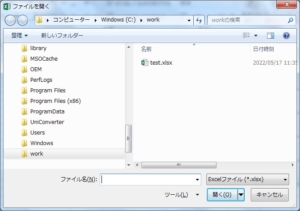
以下のプログラムを実行すると、[ファイルを開く]ダイアログボックスにExcelファイルのみが表示されます。
ここでファイルを選択すると、ファイル名のフルパスを取得できます。
(サンプル・プログラム)
- Dim filename As String
- Private Sub Sample4()
- filename = Application.GetOpenFilename(“Excelファイル (*.xlsx), *.xlsx")
- End Sub
(実行結果)
■ApplicationオブジェクトのGetSaveAsFilenameメソッド
ApplicationオブジェクトのGetSaveAsFilenameメソッドを使用すると、[名前を付けて保存]ダイアログボックスを表示することができます。
GetSaveAsFilenameメソッドの詳細
GetSaveAsFilenameメソッドは以下のように定義されています。
| GetSaveAsFilenameメソッド | |||||||||||
| 説明 | [名前を付けて保存]ダイアログボックスを表示する | ||||||||||
| 定義 | Function GetSaveAsFilename([InitialFilename As Variant], [FileFilter As Variant], [FilterIndex As Variant], [Title As Variant], [ButtonText As Variant]) As Variant | ||||||||||
GetSaveAsFilenameメソッドの引数は下表の通りです。
| 引数 | 説明 |
|---|---|
| InitialFilename | 既定値として表示するファイル名を指定(省略時は作業中のブック名) |
| FileFilter | ファイルフィルタ文字列を指定 |
| FilterIndex | ファイルフィルタ文字列の中で、何番目の値を既定値とするかを指定 |
| Title | タイトルを指定(省略時は"名前を付けて保存") |
| ButtonText | ボタンのテキストを指定(Macintoshのみ) |
GetSaveAsFilenameメソッドの使用例
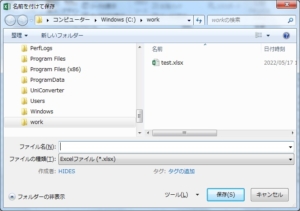
以下のプログラムを実行すると、下図の[名前を付けて保存]ダイアログボックスにExcelファイルのみが表示されます。
ここでファイルを選択すると、ファイル名のフルパスを取得できます。
(サンプル・プログラム)
- Dim filename As String
- Private Sub Sample5()
- filename = Application.GetSaveAsFilename(filefilter:="Excelファイル (*.xlsx), *.xlsx")
- End Sub
(実行結果)
■ApplicationオブジェクトのFindFileメソッド
ApplicationオブジェクトのFindFileメソッドを使用すると、[ファイルを開く]ダイアログボックスを表示することができます。
FindFileメソッドの詳細
FindFileメソッドは以下のように定義されています。
| FindFileメソッド | |||||||||||
| 説明 | [ファイルを開く]ダイアログボックスを表示し、選択されたExcelファイルを開く | ||||||||||
| 定義 | Function FindFile() As Boolean | ||||||||||
FindFileメソッドには引数が何もなく、フィルタでExcelファイルが指定されており、ファイルを選択すると選択されたファイルを開きます。
戻り値は、ファイルを正常に開くことができた場合はTrue、ダイアログボックスをキャンセルした場合はFalseです。
FindFileメソッドの使用例
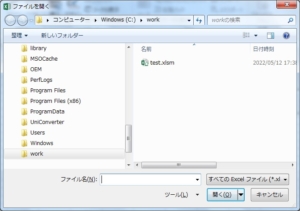
以下のプログラムを実行すると、下図の[ファイルを開く]ダイアログボックスにExcelファイルのみが表示されます。
ここでファイルを選択すると、指定したファイルを開きます。
(サンプル・プログラム)
- Private Sub Sample6()
- Application.FindFile
- End Sub
(実行結果)

出版社:インプレス
発売日:2022/3/23
単行本(ソフトカバー):A5判/912ページ

出版社:技術評論社
発売日:2021/1/9
単行本(ソフトカバー):A5判/800ページ

出版社:技術評論社
発売日:2019/11/25
単行本(ソフトカバー):B5変形判/576ページ