Excel VBAでオブジェクト指向プログラミング(Outlook VBA編)
■Outlook VBAのオブジェクトについて
MicrosoftからOutlookの機能を利用するためのオブジェクト群が提供されていますが、下位オブジェクト(サブクラス)の種類が非常に多いため、Applicationオブジェクト、Namespaceオブジェクト、Folderオブジェクトに絞って、各オブジェクトの階層構造(依存関係)を掲載します。
⇒詳細はMicrosoftのサイト(Office VBA リファレンス(Outlook))を参照して下さい。
Outlook関連オブジェクト群の階層構造
Outlook関連オブジェクト群の中で、最上位に位置するものはApplicationオブジェクトですが、実際の処理を行うためにはNamespaceオブジェクト→Folderオブジェクト→Itemオブジェクトの順で下位のオブジェクトを生成して行く必要があります。
下表はApplicationオブジェクト、Namespaceオブジェクト、Folderオブジェクトの下位オブジェクト(サブクラス)を一覧化したもの(※)で、Outlook関連オブジェクト群のオブジェクトの大半が含まれています。
(Itemオブジェクトの詳細については、次項で説明します)
(※)Visual Basic Editor(VBE)に搭載されているオブジェクトブラウザで、Applicationオブジェクト、Namespaceオブジェクト、Folderオブジェクトのメソッドおよびプロパティの定義情報を参照し、取得可能なオブジェクトをExcelにコピペして、自作のExcelツールで成形したものです。
| Applicationオブジェクト | |||
| COMAddInsコレクション | |||
| Explorerオブジェクト | |||
| Explorersコレクション | |||
| IAssistanceオブジェクト | |||
| Inspectorオブジェクト | |||
| Inspectorsコレクション | |||
| LanguageSettingsコレクション | |||
| NameSpaceオブジェクト | |||
| Accountsコレクション | |||
| AddressEntryオブジェクト | |||
| AddressListオブジェクト | |||
| AddressListsコレクション | |||
| Categoriesコレクション | |||
| Folderオブジェクト | |||
| CalendarSharingオブジェクト | |||
| Explorerオブジェクト | |||
| Itemsコレクション | |||
| OlItemTypeオブジェクト | |||
| OlObjectClassコレクション | |||
| OlShowItemCountオブジェクト | |||
| PropertyAccessorオブジェクト | |||
| StorageItemオブジェクト | |||
| Storeオブジェクト | |||
| Tableオブジェクト | |||
| UserDefinedPropertiesコレクション | |||
| Viewオブジェクト | |||
| Foldersコレクション | |||
| OlAutoDiscoverConnectionModeオブジェクト | |||
| OlExchangeConnectionModeオブジェクト | |||
| OlObjectClassコレクション | |||
| Recipientオブジェクト | |||
| SelectNamesDialogオブジェクト | |||
| OlObjectClassコレクション | |||
| Remindersコレクション | |||
| Searchオブジェクト | |||
| TimeZonesコレクション |
■Itemオブジェクトの詳細
Itemオブジェクトを新規作成する場合は、ApplicationオブジェクトのCreateItemメソッドを使用し、参照する場合はFolderオブジェクトのItemsプロパティからItemsコレクションを取得します。
Itemオブジェクトの新規作成
ApplicationオブジェクトのCreateItemメソッドを実行し、Itemオブジェクトを作成します。
- ol.CreateItem(ItemType)
ItemTypeとして指定できる項目は下表の通りです。
提供されているメソッドやプロパティはオブジェクト毎に異なりますので、最も使用頻度の高いMailItemオブジェクトのメソッドとプロパティを次項に掲載します。
| 名前 | 値 | 説明 |
|---|---|---|
| olAppointmentItem | 1 | AppointmentItemオブジェクト |
| olContactItem | 2 | ContactItemオブジェクト |
| olDistributionListItem | 7 | DistListItemオブジェクト |
| olJournalItem | 4 | JournalItemオブジェクト |
| olMailItem | 0 | MailItemオブジェクト |
| olNoteItem | 5 | NoteItemオブジェクト |
| olPostItem | 6 | PostItemオブジェクト |
| olTaskItem | 3 | TaskItemオブジェクト |
MailItemオブジェクトのメソッド
MailItemオブジェクトで提供されているメソッドおよび定義内容は、下表の通りです。
| AddBusinessCardメソッド | |||||||||||
| Sub AddBusinessCard(contact As ContactItem) | |||||||||||
| ClearConversationIndexメソッド | |||||||||||
| Sub ClearConversationIndex() | |||||||||||
| ClearTaskFlagメソッド | |||||||||||
| Sub ClearTaskFlag() | |||||||||||
| Closeメソッド | |||||||||||
| Sub Close(SaveMode As OlInspectorClose) | |||||||||||
| Copyメソッド | |||||||||||
| Function Copy() As Object | |||||||||||
| Deleteメソッド | |||||||||||
| Sub Delete() | |||||||||||
| Displayメソッド | |||||||||||
| Sub Display([Modal]) | |||||||||||
| Forwardメソッド | |||||||||||
| Function Forward() As MailItem | |||||||||||
| MarkAsTaskメソッド | |||||||||||
| Sub MarkAsTask(MarkInterval As OlMarkInterval) | |||||||||||
| Moveメソッド | |||||||||||
| Function Move(DestFldr As Folder) As Object | |||||||||||
| PrintOutメソッド | |||||||||||
| Sub PrintOut() | |||||||||||
| Replyメソッド | |||||||||||
| Function Reply() As MailItem | |||||||||||
| ReplyAllメソッド | |||||||||||
| Function ReplyAll() As MailItem | |||||||||||
| Saveメソッド | |||||||||||
| Sub Save() | |||||||||||
| SaveAsメソッド | |||||||||||
| Sub SaveAs(Path As String, [Type]) | |||||||||||
| Sendメソッド | |||||||||||
| Sub Send() | |||||||||||
| ShowCategoriesDialogメソッド | |||||||||||
| Sub ShowCategoriesDialog() | |||||||||||
MailItemオブジェクトのプロパティ
MailItemオブジェクトで提供されているプロパティおよび定義内容は、下表の通りです。
| Actionsプロパティ(読み取り専用) | |||||||||||
| Property Actions As Actions | |||||||||||
| AlternateRecipientAllowedプロパティ | |||||||||||
| Property AlternateRecipientAllowed As Boolean | |||||||||||
| Applicationプロパティ(読み取り専用) | |||||||||||
| Property Application As Application | |||||||||||
| Attachmentsプロパティ(読み取り専用) | |||||||||||
| Property Attachments As Attachments | |||||||||||
| AutoForwardedプロパティ | |||||||||||
| Property AutoForwarded As Boolean | |||||||||||
| AutoResolvedWinnerプロパティ(読み取り専用) | |||||||||||
| Property AutoResolvedWinner As Boolean | |||||||||||
| BCCプロパティ | |||||||||||
| Property BCC As String | |||||||||||
| BillingInformationプロパティ | |||||||||||
| Property BillingInformation As String | |||||||||||
| Bodyプロパティ | |||||||||||
| Property Body As String | |||||||||||
| BodyFormatプロパティ | |||||||||||
| Property BodyFormat As OlBodyFormat | |||||||||||
| Categoriesプロパティ | |||||||||||
| Property Categories As String | |||||||||||
| CCプロパティ | |||||||||||
| Property CC As String | |||||||||||
| Classプロパティ(読み取り専用) | |||||||||||
| Property Class As OlObjectClass | |||||||||||
| Companiesプロパティ | |||||||||||
| Property Companies As String | |||||||||||
| Conflictsプロパティ(読み取り専用) | |||||||||||
| Property Conflicts As Conflicts | |||||||||||
| ConversationIndexプロパティ(読み取り専用) | |||||||||||
| Property ConversationIndex As String | |||||||||||
| ConversationTopicプロパティ(読み取り専用) | |||||||||||
| Property ConversationTopic As String | |||||||||||
| CreationTimeプロパティ(読み取り専用) | |||||||||||
| Property CreationTime As Date | |||||||||||
| DeferredDeliveryTimeプロパティ | |||||||||||
| Property DeferredDeliveryTime As Date | |||||||||||
| DeleteAfterSubmitプロパティ | |||||||||||
| Property DeleteAfterSubmit As Boolean | |||||||||||
| DownloadStateプロパティ(読み取り専用) | |||||||||||
| Property DownloadState As OlDownloadState | |||||||||||
| EntryIDプロパティ(読み取り専用) | |||||||||||
| Property EntryID As String | |||||||||||
| ExpiryTimeプロパティ | |||||||||||
| Property ExpiryTime As Date | |||||||||||
| FlagRequestプロパティ | |||||||||||
| Property FlagRequest As String | |||||||||||
| FormDescriptionプロパティ(読み取り専用) | |||||||||||
| Property FormDescription As FormDescription | |||||||||||
| GetInspectorプロパティ(読み取り専用) | |||||||||||
| Property GetInspector As Inspector | |||||||||||
| HTMLBodyプロパティ | |||||||||||
| Property HTMLBody As String | |||||||||||
| Importanceプロパティ | |||||||||||
| Property Importance As OlImportance | |||||||||||
| InternetCodepageプロパティ | |||||||||||
| Property InternetCodepage As Long | |||||||||||
| IsConflictプロパティ(読み取り専用) | |||||||||||
| Property IsConflict As Boolean | |||||||||||
| IsMarkedAsTaskプロパティ(読み取り専用) | |||||||||||
| Property IsMarkedAsTask As Boolean | |||||||||||
| ItemPropertiesプロパティ(読み取り専用) | |||||||||||
| Property ItemProperties As ItemProperties | |||||||||||
| LastModificationTimeプロパティ(読み取り専用) | |||||||||||
| Property LastModificationTime As Date | |||||||||||
| Linksプロパティ(読み取り専用) | |||||||||||
| Property Links As Links | |||||||||||
| MarkForDownloadプロパティ | |||||||||||
| Property MarkForDownload As OlRemoteStatus | |||||||||||
| MessageClassプロパティ | |||||||||||
| Property MessageClass As String | |||||||||||
| Mileageプロパティ | |||||||||||
| Property Mileage As String | |||||||||||
| NoAgingプロパティ | |||||||||||
| Property NoAging As Boolean | |||||||||||
| OriginatorDeliveryReportRequestedプロパティ | |||||||||||
| Property OriginatorDeliveryReportRequested As Boolean | |||||||||||
| OutlookInternalVersionプロパティ(読み取り専用) | |||||||||||
| Property OutlookInternalVersion As Long | |||||||||||
| OutlookVersionプロパティ(読み取り専用) | |||||||||||
| Property OutlookVersion As String | |||||||||||
| Parentプロパティ(読み取り専用) | |||||||||||
| Property Parent As Object | |||||||||||
| Permissionプロパティ | |||||||||||
| Property Permission As OlPermission | |||||||||||
| PermissionServiceプロパティ | |||||||||||
| Property PermissionService As OlPermissionService | |||||||||||
| PropertyAccessorプロパティ(読み取り専用) | |||||||||||
| Property PropertyAccessor As PropertyAccessor | |||||||||||
| ReadReceiptRequestedプロパティ | |||||||||||
| Property ReadReceiptRequested As Boolean | |||||||||||
| ReceivedByEntryIDプロパティ(読み取り専用) | |||||||||||
| Property ReceivedByEntryID As String | |||||||||||
| ReceivedByNameプロパティ(読み取り専用) | |||||||||||
| Property ReceivedByName As String | |||||||||||
| ReceivedOnBehalfOfEntryIDプロパティ(読み取り専用) | |||||||||||
| Property ReceivedOnBehalfOfEntryID As String | |||||||||||
| ReceivedOnBehalfOfNameプロパティ(読み取り専用) | |||||||||||
| Property ReceivedOnBehalfOfName As String | |||||||||||
| ReceivedTimeプロパティ(読み取り専用) | |||||||||||
| Property ReceivedTime As Date | |||||||||||
| RecipientReassignmentProhibitedプロパティ | |||||||||||
| Property RecipientReassignmentProhibited As Boolean | |||||||||||
| Recipientsプロパティ(読み取り専用) | |||||||||||
| Property Recipients As Recipients | |||||||||||
| ReminderOverrideDefaultプロパティ | |||||||||||
| Property ReminderOverrideDefault As Boolean | |||||||||||
| ReminderPlaySoundプロパティ | |||||||||||
| Property ReminderPlaySound As Boolean | |||||||||||
| ReminderSetプロパティ | |||||||||||
| Property ReminderSet As Boolean | |||||||||||
| ReminderSoundFileプロパティ | |||||||||||
| Property ReminderSoundFile As String | |||||||||||
| ReminderTimeプロパティ | |||||||||||
| Property ReminderTime As Date | |||||||||||
| RemoteStatusプロパティ | |||||||||||
| Property RemoteStatus As OlRemoteStatus | |||||||||||
| ReplyRecipientNamesプロパティ(読み取り専用) | |||||||||||
| Property ReplyRecipientNames As String | |||||||||||
| ReplyRecipientsプロパティ(読み取り専用) | |||||||||||
| Property ReplyRecipients As Recipients | |||||||||||
| Savedプロパティ(読み取り専用) | |||||||||||
| Property Saved As Boolean | |||||||||||
| SaveSentMessageFolderプロパティ | |||||||||||
| Property SaveSentMessageFolder As Folder | |||||||||||
| SenderEmailAddressプロパティ(読み取り専用) | |||||||||||
| Property SenderEmailAddress As String | |||||||||||
| SenderEmailTypeプロパティ(読み取り専用) | |||||||||||
| Property SenderEmailType As String | |||||||||||
| SenderNameプロパティ(読み取り専用) | |||||||||||
| Property SenderName As String | |||||||||||
| SendUsingAccountプロパティ | |||||||||||
| Property SendUsingAccount As Account | |||||||||||
| Sensitivityプロパティ | |||||||||||
| Property Sensitivity As OlSensitivity | |||||||||||
| Sentプロパティ(読み取り専用) | |||||||||||
| Property Sent As Boolean | |||||||||||
| SentOnプロパティ(読み取り専用) | |||||||||||
| Property SentOn As Date | |||||||||||
| SentOnBehalfOfNameプロパティ | |||||||||||
| Property SentOnBehalfOfName As String | |||||||||||
| Sessionプロパティ(読み取り専用) | |||||||||||
| Property Session As NameSpace | |||||||||||
| Sizeプロパティ(読み取り専用) | |||||||||||
| Property Size As Long | |||||||||||
| Subjectプロパティ | |||||||||||
| Property Subject As String | |||||||||||
| Submittedプロパティ(読み取り専用) | |||||||||||
| Property Submitted As Boolean | |||||||||||
| TaskCompletedDateプロパティ | |||||||||||
| Property TaskCompletedDate As Date | |||||||||||
| TaskDueDateプロパティ | |||||||||||
| Property TaskDueDate As Date | |||||||||||
| TaskStartDateプロパティ | |||||||||||
| Property TaskStartDate As Date | |||||||||||
| TaskSubjectプロパティ | |||||||||||
| Property TaskSubject As String | |||||||||||
| Toプロパティ | |||||||||||
| Property To As String | |||||||||||
| ToDoTaskOrdinalプロパティ | |||||||||||
| Property ToDoTaskOrdinal As Date | |||||||||||
| UnReadプロパティ | |||||||||||
| Property UnRead As Boolean | |||||||||||
| UserPropertiesプロパティ(読み取り専用) | |||||||||||
| Property UserProperties As UserProperties | |||||||||||
| VotingOptionsプロパティ | |||||||||||
| Property VotingOptions As String | |||||||||||
| VotingResponseプロパティ | |||||||||||
| Property VotingResponse As String | |||||||||||
■Outlookのオブジェクトを使用するための事前準備
Outlookのオブジェクトを使用するための事前準備は、以下の3ステップです。
⇒オブジェクトを使用するための事前準備とオブジェクトブラウザによる調査方法については、Excel VBAでオブジェクト指向プログラミング(事前準備編)を参照して下さい。
①ライブラリの参照設定
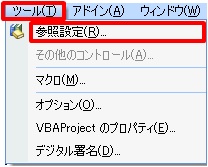
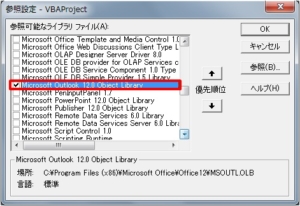
Visual Basic Editor(VBE)のファイルメニューから[ツール]-[参照設定]を選択し、参照設定ダイアログでMicrosoft Outlook x.x Object Libraryのチェックボックスにチェックを入れ、[OK]ボタンを押下。
②オブジェクト変数の定義
プログラムの宣言部でオブジェクト変数を定義。
- Dim ol As Object
③インスタンスの生成
プログラムの処理部でインスタンスを生成。
- Set ol = New Outlook.Application
- 'ここにOutlookを使用した処理を記述
- Set ol = Nothing
(参考)「Set ol = New Outlook.Application」の部分を「Set ol = CreateObject(“Outlook.Application")」と記述すれば、ステップ①(ライブラリの参照設定)は不要です。
■Outlookの受信トレイにあるメールを一覧にする処理
Outlookを起動して、受信トレイを取得し、メールの一覧を作成するExcelツールです。
処理の概要
処理の流れは以下の通りです。
①Outlookを起動し、NameSpaceオブジェクトを作成後、受信トレイを取得
②全てのメールを順に参照し、Excelシートに情報をセット
③使用済のオブジェクトを破棄し、Outlookを終了
サンプル・プログラム
行番号8でOutlookを起動し、行番号9でNameSpaceオブジェクトを作成、行番号10で受信トレイを取得しています。
行番号13~15でMailItemオブジェクトのSubjectプロパティ、SenderNameプロパティ、SentOnプロパティから、件名、送信者、送信日時を取得しています。
(注)MailItemオブジェクト用のオブジェクト変数を定義する際、行番号1で「Dim sht, ol, ns, fl, mi As Object」と定義したところ、正しく動作しないケースがあったため、行番号2で「Dim mi As Outlook.MailItem」と厳格な定義を行っています。
- Dim sht, ol, ns, fl As Object
- Dim mi As Outlook.MailItem
- Dim i, pos As Integer
- Private Sub Sample1()
- Set sht = ActiveSheet
- i = 0
- Set ol = New Outlook.Application
- Set ns = ol.GetNamespace(“MAPI")
- Set fl = ns.GetDefaultFolder(olFolderInbox)
- For Each mi In fl.Items
- i = i + 1
- sht.Cells(i, 1) = mi.Subject
- sht.Cells(i, 2) = mi.SenderName
- sht.Cells(i, 3) = mi.SentOn
- sht.Cells(i, 3).NumberFormatLocal = “yyyy/mm/dd hh:mm:ss"
- Next mi
- Set mi = Nothing
- Set fl = Nothing
- Set ns = Nothing
- ol.Quit
- Set ol = Nothing
- End Sub
■Excelシートの情報からOutlookのメールを作成し、自動送信する処理
Outlookを起動して、Excelシートの情報から作成したメールを自動送信するExcelツールです。
処理の概要
処理の流れは以下の通りです。
①Outlookを起動し、MailItemオブジェクトを新規作成
②Excelシートの情報からメールを作成し、Sendメソッドで送信
③使用済のオブジェクトを破棄し、Outlookを終了
サンプル・プログラム
行番号8でOutlookを起動し、行番号9でApplicationオブジェクトのCreateItemメソッドにより、MailItemオブジェクトを新規作成しています。
行番号11~13でExcelシート上の宛先、件名、本文をMailItemオブジェクトのToプロパティ、Subjectプロパティ、Bodyプロパティにセットし、行番号14で「メッセージ形式をテキスト形式にする」指定を行った後、行番号15で送信しています。
(注)MailItemオブジェクト用のオブジェクト変数を定義する際、行番号1で「Dim sht, ol, mi As Object」と定義したところ、正しく動作しなかったため、行番号2で「Dim mi As Outlook.MailItem」と厳格な定義を行っています。
- Dim sht, ol As Object
- Dim mi As Outlook.MailItem
- Dim i, pos As Integer
- Private Sub Sample2()
- Set sht = ActiveSheet
- i = 0
- Set ol = New Outlook.Application
- Set mi = ol.CreateItem(olMailItem)
- mi.To = sht.Cells(1, 1)
- mi.Subject = sht.Cells(1, 2)
- mi.Body = sht.Cells(1, 3)
- mi.BodyFormat = olFormatPlain
- mi.Send
- Set mi = Nothing
- ol.Quit
- Set ol = Nothing
- End Sub
■Outlookの予定表に登録された情報を一覧にする処理
Outlookを起動して、予定表を取得し、登録された情報の一覧を作成するExcelツールです。
処理の概要
処理の流れは以下の通りです。
①Outlookを起動し、NameSpaceオブジェクトを作成後、予定表を取得
②全ての登録情報を順に参照し、Excelシートに情報をセット
③使用済のオブジェクトを破棄し、Outlookを終了
サンプル・プログラム
行番号7でOutlookを起動し、行番号8でNameSpaceオブジェクトを作成、行番号9で予定表を取得しています。
行番号12~15でAppointmentItemオブジェクトのSubjectプロパティ、Locationプロパティ、Startプロパティ、Endプロパティから、件名、場所、開始日時、終了日時を取得しています。
- Dim sht, ol, ns, fl, ci As Object
- Dim i, pos As Integer
- Private Sub Sample3()
- Set sht = ActiveSheet
- i = 0
- Set ol = New Outlook.Application
- Set ns = ol.GetNamespace(“MAPI")
- Set fl = ns.GetDefaultFolder(olFolderCalendar)
- For Each ci In fl.Items
- i = i + 1
- sht.Cells(i, 1) = ci.Subject
- sht.Cells(i, 2) = ci.Location
- sht.Cells(i, 3) = ci.Start
- sht.Cells(i, 4) = ci.End
- sht.Range(sht.Cells(i, 3), sht.Cells(i, 4)).NumberFormatLocal = “yyyy/mm/dd hh:mm:ss"
- Next ci
- Set ci = Nothing
- Set fl = Nothing
- Set ns = Nothing
- ol.Quit
- Set ol = Nothing
- End Sub

出版社:インプレス
発売日:2022/3/23
単行本(ソフトカバー):A5判/912ページ

出版社:技術評論社
発売日:2021/1/9
単行本(ソフトカバー):A5判/800ページ

出版社:技術評論社
発売日:2019/11/25
単行本(ソフトカバー):B5変形判/576ページ