Excel VBAでオブジェクト指向プログラミング(Access VBA編)
■Access VBAのオブジェクトについて
MicrosoftからAccessの機能を利用するためのオブジェクト群が提供されていますが、下位オブジェクト(サブクラス)の種類が非常に多いため、最上位のApplicationオブジェクトに絞って、メソッドとプロパティの一覧を掲載します。
⇒詳細はMicrosoftのサイト(Office VBA リファレンス(Access))を参照して下さい。
Applicationオブジェクトのメソッド
Applicationオブジェクトで提供されているメソッドおよび定義内容は、下表の通りです。
| AccessErrorメソッド | |||||||||||
| Function AccessError(ErrorNumber) | |||||||||||
| AddToFavoritesメソッド | |||||||||||
| Sub AddToFavorites() | |||||||||||
| BuildCriteriaメソッド | |||||||||||
| Function BuildCriteria(Field As String, FieldType As Integer, Expression As String) As String | |||||||||||
| CloseCurrentDatabaseメソッド | |||||||||||
| Sub CloseCurrentDatabase() | |||||||||||
| CodeDbメソッド | |||||||||||
| Function CodeDb() As Database | |||||||||||
| ColumnHistoryメソッド | |||||||||||
| Function ColumnHistory(TableName As String, ColumnName As String, queryString As String) As String | |||||||||||
| CompactRepairメソッド | |||||||||||
| Function CompactRepair(SourceFile As String, DestinationFile As String, [LogFile As Boolean = False]) As Boolean | |||||||||||
| ConvertAccessProjectメソッド | |||||||||||
| Sub ConvertAccessProject(SourceFilename As String, DestinationFilename As String, DestinationFileFormat As AcFileFormat) | |||||||||||
| CreateAccessProjectメソッド | |||||||||||
| Sub CreateAccessProject(filepath As String, [Connect]) | |||||||||||
| CreateAdditionalDataメソッド | |||||||||||
| Function CreateAdditionalData() As AdditionalData | |||||||||||
| CreateControlメソッド | |||||||||||
| Function CreateControl(FormName As String, ControlType As AcControlType, [Section As AcSection = acDetail], [Parent], [ColumnName], [Left], [Top], [Width], [Height]) As Control | |||||||||||
| CreateFormメソッド | |||||||||||
| Function CreateForm([Database], [FormTemplate]) As Form | |||||||||||
| CreateGroupLevelメソッド | |||||||||||
| Function CreateGroupLevel(ReportName As String, Expression As String, Header As Integer, Footer As Integer) As Long | |||||||||||
| CreateReportメソッド | |||||||||||
| Function CreateReport([Database], [ReportTemplate]) As Report | |||||||||||
| CreateReportControlメソッド | |||||||||||
| Function CreateReportControl(ReportName As String, ControlType As AcControlType, [Section As AcSection = acDetail], [Parent], [ColumnName], [Left], [Top], [Width], [Height]) As Control | |||||||||||
| CurrentDbメソッド | |||||||||||
| Function CurrentDb() As Database | |||||||||||
| CurrentUserメソッド | |||||||||||
| Function CurrentUser() As String | |||||||||||
| DAvgメソッド | |||||||||||
| Function DAvg(Expr As String, Domain As String, [Criteria]) | |||||||||||
| DCountメソッド | |||||||||||
| Function DCount(Expr As String, Domain As String, [Criteria]) | |||||||||||
| DDEExecuteメソッド | |||||||||||
| Sub DDEExecute(ChanNum, Command As String) | |||||||||||
| DDEInitiateメソッド | |||||||||||
| Function DDEInitiate(Application As String, Topic As String) | |||||||||||
| DDEPokeメソッド | |||||||||||
| Sub DDEPoke(ChanNum, Item As String, Data As String) | |||||||||||
| DDERequestメソッド | |||||||||||
| Function DDERequest(ChanNum, Item As String) As String | |||||||||||
| DDETerminateメソッド | |||||||||||
| Sub DDETerminate(ChanNum) | |||||||||||
| DDETerminateAllメソッド | |||||||||||
| Sub DDETerminateAll() | |||||||||||
| DefaultWorkspaceCloneメソッド | |||||||||||
| Function DefaultWorkspaceClone() As Workspace | |||||||||||
| DeleteControlメソッド | |||||||||||
| Sub DeleteControl(FormName As String, ControlName As String) | |||||||||||
| DeleteReportControlメソッド | |||||||||||
| Sub DeleteReportControl(ReportName As String, ControlName As String) | |||||||||||
| DFirstメソッド | |||||||||||
| Function DFirst(Expr As String, Domain As String, [Criteria]) | |||||||||||
| DLastメソッド | |||||||||||
| Function DLast(Expr As String, Domain As String, [Criteria]) | |||||||||||
| DLookupメソッド | |||||||||||
| Function DLookup(Expr As String, Domain As String, [Criteria]) | |||||||||||
| DMaxメソッド | |||||||||||
| Function DMax(Expr As String, Domain As String, [Criteria]) | |||||||||||
| DMinメソッド | |||||||||||
| Function DMin(Expr As String, Domain As String, [Criteria]) | |||||||||||
| DStDevメソッド | |||||||||||
| Function DStDev(Expr As String, Domain As String, [Criteria]) | |||||||||||
| DStDevPメソッド | |||||||||||
| Function DStDevP(Expr As String, Domain As String, [Criteria]) | |||||||||||
| DSumメソッド | |||||||||||
| Function DSum(Expr As String, Domain As String, [Criteria]) | |||||||||||
| DVarメソッド | |||||||||||
| Function DVar(Expr As String, Domain As String, [Criteria]) | |||||||||||
| DVarPメソッド | |||||||||||
| Function DVarP(Expr As String, Domain As String, [Criteria]) | |||||||||||
| Echoメソッド | |||||||||||
| Sub Echo(EchoOn As Integer, [bstrStatusBarText As String]) | |||||||||||
| EuroConvertメソッド | |||||||||||
| Function EuroConvert(Number As Double, SourceCurrency As String, TargetCurrency As String, [FullPrecision], [TriangulationPrecision]) As Double | |||||||||||
| Evalメソッド | |||||||||||
| Function Eval(StringExpr As String) | |||||||||||
| ExportNavigationPaneメソッド | |||||||||||
| Sub ExportNavigationPane(Path As String) | |||||||||||
| ExportXMLメソッド | |||||||||||
| Sub ExportXML(ObjectType As AcExportXMLObjectType, DataSource As String, [DataTarget As String], [SchemaTarget As String], [PresentationTarget As String], [ImageTarget As String], [Encoding As AcExportXMLEncoding = acUTF8], [OtherFlags As AcExportXMLOtherFlags], [WhereCondition As String], [AdditionalData]) | |||||||||||
| FollowHyperlinkメソッド | |||||||||||
| Sub FollowHyperlink(Address As String, [SubAddress As String], [NewWindow As Boolean = False], [AddHistory As Boolean = True], [ExtraInfo], [Method As MsoExtraInfoMethod], [HeaderInfo As String]) | |||||||||||
| GetHiddenAttributeメソッド | |||||||||||
| Function GetHiddenAttribute(ObjectType As AcObjectType, ObjectName As String) As Boolean | |||||||||||
| GetOptionメソッド | |||||||||||
| Function GetOption(OptionName As String) | |||||||||||
| GUIDFromStringメソッド | |||||||||||
| Function GUIDFromString(String) | |||||||||||
| HtmlEncodeメソッド | |||||||||||
| Function HtmlEncode(PlainText, [Length]) As String | |||||||||||
| hWndAccessAppメソッド | |||||||||||
| Function hWndAccessApp() As Long | |||||||||||
| HyperlinkPartメソッド | |||||||||||
| Function HyperlinkPart(Hyperlink, [Part As AcHyperlinkPart = acDisplayedValue]) As String | |||||||||||
| ImportNavigationPaneメソッド | |||||||||||
| Sub ImportNavigationPane(Path As String, [fAppendOnly As Boolean = False]) | |||||||||||
| ImportXMLメソッド | |||||||||||
| Sub ImportXML(DataSource As String, [ImportOptions As AcImportXMLOption = acStructureAndData]) | |||||||||||
| LoadCustomUIメソッド | |||||||||||
| Sub LoadCustomUI(CustomUIName As String, CustomUIXML As String) | |||||||||||
| LoadPictureメソッド | |||||||||||
| Function LoadPicture(FileName As String) As Object | |||||||||||
| NewAccessProjectメソッド | |||||||||||
| Sub NewAccessProject(filepath As String, [Connect]) | |||||||||||
| NewCurrentDatabaseメソッド | |||||||||||
| Sub NewCurrentDatabase(filepath As String, [FileFormat As AcNewDatabaseFormat = acNewDatabaseFormatUserDefault], [Template], [SiteAddress As String], [ListID As String]) | |||||||||||
| Nzメソッド | |||||||||||
| Function Nz(Value, [ValueIfNull]) | |||||||||||
| OpenAccessProjectメソッド | |||||||||||
| Sub OpenAccessProject(filepath As String, [Exclusive As Boolean = False]) | |||||||||||
| OpenCurrentDatabaseメソッド | |||||||||||
| Sub OpenCurrentDatabase(filepath As String, [Exclusive As Boolean = False], [bstrPassword As String]) | |||||||||||
| PlainTextメソッド | |||||||||||
| Function PlainText(RichText, [Length]) As String | |||||||||||
| Quitメソッド | |||||||||||
| Sub Quit([Option As AcQuitOption = acQuitSaveAll]) | |||||||||||
| RefreshDatabaseWindowメソッド | |||||||||||
| Sub RefreshDatabaseWindow() | |||||||||||
| RefreshTitleBarメソッド | |||||||||||
| Sub RefreshTitleBar() | |||||||||||
| Runメソッド | |||||||||||
| Function Run(Procedure As String, [Arg1], [Arg2], [Arg3], [Arg4], [Arg5], [Arg6], [Arg7], [Arg8], [Arg9], [Arg10], [Arg11], [Arg12], [Arg13], [Arg14], [Arg15], [Arg16], [Arg17], [Arg18], [Arg19], [Arg20], [Arg21], [Arg22], [Arg23], [Arg24], [Arg25], [Arg26], [Arg27], [Arg28], [Arg29], [Arg30]) | |||||||||||
| RunCommandメソッド | |||||||||||
| Sub RunCommand(Command As AcCommand) | |||||||||||
| SetDefaultWorkgroupFileメソッド | |||||||||||
| Sub SetDefaultWorkgroupFile(Path As String) | |||||||||||
| SetHiddenAttributeメソッド | |||||||||||
| Sub SetHiddenAttribute(ObjectType As AcObjectType, ObjectName As String, fHidden As Boolean) | |||||||||||
| SetOptionメソッド | |||||||||||
| Sub SetOption(OptionName As String, Setting) | |||||||||||
| StringFromGUIDメソッド | |||||||||||
| Function StringFromGUID(Guid) | |||||||||||
| SysCmdメソッド | |||||||||||
| Function SysCmd(Action As AcSysCmdAction, [Argument2], [Argument3]) | |||||||||||
| TransformXMLメソッド | |||||||||||
| Sub TransformXML(DataSource As String, TransformSource As String, OutputTarget As String, [WellFormedXMLOutput As Boolean = False], [ScriptOption As AcTransformXMLScriptOption = acPromptScript]) | |||||||||||
Applicationオブジェクトのプロパティ
Applicationオブジェクトで提供されているプロパティおよび定義内容は、下表の通りです。
| AnswerWizardプロパティ(読み取り専用) | |||||||||||
| Property AnswerWizard As AnswerWizard | |||||||||||
| Applicationプロパティ(読み取り専用) | |||||||||||
| Property Application As Application | |||||||||||
| Assistanceプロパティ(読み取り専用) | |||||||||||
| Property Assistance As IAssistance | |||||||||||
| Assistantプロパティ(読み取り専用) | |||||||||||
| Property Assistant As Assistant | |||||||||||
| AutoCorrectプロパティ(読み取り専用) | |||||||||||
| Property AutoCorrect As AutoCorrect | |||||||||||
| AutomationSecurityプロパティ | |||||||||||
| Property AutomationSecurity As MsoAutomationSecurity | |||||||||||
| BrokenReferenceプロパティ(読み取り専用) | |||||||||||
| Property BrokenReference As Boolean | |||||||||||
| Buildプロパティ(読み取り専用) | |||||||||||
| Property Build As Long | |||||||||||
| CodeContextObjectプロパティ(読み取り専用) | |||||||||||
| Property CodeContextObject As Object | |||||||||||
| CodeDataプロパティ(読み取り専用) | |||||||||||
| Property CodeData As CodeData | |||||||||||
| CodeProjectプロパティ(読み取り専用) | |||||||||||
| Property CodeProject As CodeProject | |||||||||||
| COMAddInsプロパティ(読み取り専用) | |||||||||||
| Property COMAddIns As COMAddIns | |||||||||||
| CommandBarsプロパティ(読み取り専用) | |||||||||||
| Property CommandBars As CommandBars | |||||||||||
| CurrentDataプロパティ(読み取り専用) | |||||||||||
| Property CurrentData As CurrentData | |||||||||||
| CurrentObjectNameプロパティ(読み取り専用) | |||||||||||
| Property CurrentObjectName As String | |||||||||||
| CurrentObjectTypeプロパティ(読み取り専用) | |||||||||||
| Property CurrentObjectType As AcObjectType | |||||||||||
| CurrentProjectプロパティ(読み取り専用) | |||||||||||
| Property CurrentProject As CurrentProject | |||||||||||
| DBEngineプロパティ(読み取り専用) | |||||||||||
| Property DBEngine As DBEngine | |||||||||||
| DoCmdプロパティ(読み取り専用) | |||||||||||
| Property DoCmd As DoCmd | |||||||||||
| FeatureInstallプロパティ | |||||||||||
| Property FeatureInstall As MsoFeatureInstall | |||||||||||
| FileDialogメソッド(読み取り専用) | |||||||||||
| Property FileDialog(dialogType As MsoFileDialogType) As FileDialog | |||||||||||
| Formsプロパティ(読み取り専用) | |||||||||||
| Property Forms As Forms | |||||||||||
| IsCompiledプロパティ(読み取り専用) | |||||||||||
| Property IsCompiled As Boolean | |||||||||||
| LanguageSettingsプロパティ(読み取り専用) | |||||||||||
| Property LanguageSettings As LanguageSettings | |||||||||||
| MacroErrorプロパティ(読み取り専用) | |||||||||||
| Property MacroError As MacroError | |||||||||||
| MenuBarプロパティ | |||||||||||
| Property MenuBar As String | |||||||||||
| Modulesプロパティ(読み取り専用) | |||||||||||
| Property Modules As Modules | |||||||||||
| Nameプロパティ(読み取り専用) | |||||||||||
| Property Name As String | |||||||||||
| NewFileTaskPaneプロパティ(読み取り専用) | |||||||||||
| Property NewFileTaskPane As NewFile | |||||||||||
| Parentプロパティ(読み取り専用) | |||||||||||
| Property Parent As Object | |||||||||||
| Printerプロパティ | |||||||||||
| Property Printer As Printer | |||||||||||
| Printersプロパティ(読み取り専用) | |||||||||||
| Property Printers As Printers | |||||||||||
| ProductCodeプロパティ(読み取り専用) | |||||||||||
| Property ProductCode As String | |||||||||||
| Referencesプロパティ(読み取り専用) | |||||||||||
| Property References As References | |||||||||||
| Reportsプロパティ(読み取り専用) | |||||||||||
| Property Reports As Reports | |||||||||||
| Screenプロパティ(読み取り専用) | |||||||||||
| Property Screen As Screen | |||||||||||
| ShortcutMenuBarプロパティ | |||||||||||
| Property ShortcutMenuBar As String | |||||||||||
| TempVarsプロパティ(読み取り専用) | |||||||||||
| Property TempVars As TempVars | |||||||||||
| UserControlプロパティ | |||||||||||
| Property UserControl As Boolean | |||||||||||
| VBEプロパティ(読み取り専用) | |||||||||||
| Property VBE As VBE | |||||||||||
| Versionプロパティ(読み取り専用) | |||||||||||
| Property Version As String | |||||||||||
| Visibleプロパティ | |||||||||||
| Property Visible As Boolean | |||||||||||
■Accessのオブジェクトを使用するための事前準備
Accessのオブジェクトを使用するための事前準備は、以下の3ステップです。
⇒オブジェクトを使用するための事前準備とオブジェクトブラウザによる調査方法については、Excel VBAでオブジェクト指向プログラミング(事前準備編)を参照して下さい。
①ライブラリの参照設定
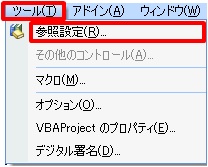
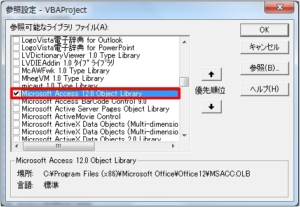
Visual Basic Editor(VBE)のファイルメニューから[ツール]-[参照設定]を選択し、参照設定ダイアログでMicrosoft Access x.x Object Libraryのチェックボックスにチェックを入れ、[OK]ボタンを押下。
②オブジェクト変数の定義
プログラムの宣言部でオブジェクト変数を定義。
- Dim ac As Object
③インスタンスの生成
プログラムの処理部でインスタンスを生成。
- Set ac = New Access.Application
- 'ここにAccessを使用した処理を記述
- Set ac = Nothing
(参考)「Set ac = New Access.Application」の部分を「Set ac = CreateObject(“Access.Application")」と記述すれば、ステップ①(ライブラリの参照設定)は不要です。
■Accessデータベースからデータを取得する処理
ApplicationオブジェクトのDBEngineプロパティにより、DAOのDBEngineオブジェクトを取得できますので、それ以降はDAOの機能を利用して処理を行うことができます。
ここではAccessのオブジェクトからDAOでデータベースをオープンし、レコードを読み出す処理について、詳細な手順を説明します。
⇒DAOの詳細については、Excel VBAでオブジェクト指向プログラミング(DAO編)を参照して下さい。
データベースのオープン
DBEngineオブジェクトのOpenDatabaseメソッドを実行し、Databaseオブジェクトを作成します。
- dbe.OpenDatabase(Name, [Options], [ReadOnly], [Connect])
引数として指定できる項目は下表の通りですが、指定必須の引数はNameだけです。
| 引数 | 説明 |
|---|---|
| Name | データベースのパス |
| Options | True:排他モード/False:共有モード(既定値) |
| ReadOnly | True:読み取り専用)/False:読み取り/書き込み(既定値) |
| Connect | パスワードなどさまざまな接続情報を指定 |
レコードの読み出し
DatabaseオブジェクトのOpenRecordsetメソッドを実行し、Recordsetオブジェクトを作成します。
- db.OpenRecordset(Name, [Type], [Options], [LockEdit])
引数として指定できる項目は下表の通りですが、指定必須の引数はNameだけです。
| 引数 | 説明 |
|---|---|
| Name | Recordsetの取得元(テーブル名、クエリ名、SQL)を指定 |
| Type | Recordsetオブジェクトの種類を指定 |
| Options | Recordsetオブジェクトの特性を指定 |
| LockEdit | レコードロックの種類を指定 |
Accessデータベースから検索条件と一致したレコードを読み出し
ExcelシートのA列に格納された氏名を基に、Accessの住所録を検索し、ExcelシートのB列に郵便番号、C列に住所をセットするツールです。
行番号7でAccess.ApplicationオブジェクトのDBEngineプロパティから、DAOのDBEngineオブジェクトを取得しています。
行番号10でDatabaseオブジェクトのOpenRecordsetメソッドにSQLを指定し、SELECT文のWHERE句で条件式を指定しています。
引用符が入れ子になっていてわかり難いですが、WHERE句の部分は『WHERE 氏名=’○□ △☆’』といった形式です。
- Dim sht, ac, dbe, db, rs As Object
- Dim i As Integer
- Private Sub Sample1()
- Set sht = ActiveSheet
- Set ac = New Access.Application
- Set dbe = ac.DBEngine
- Set db = dbe.OpenDatabase(“C:\work\住所録.mdb")
- For i = 1 To sht.Cells(sht.Rows.Count, 1).End(xlUp).Row
- Set rs = db.OpenRecordset(“SELECT 氏名,郵便番号,住所 from 住所録 WHERE 氏名='" & sht.Cells(1, 1) & “'")
- If rs.EOF = False Then
- sht.Cells(1, 2) = rs.Fields(“郵便番号")
- sht.Cells(1, 3) = rs.Fields(“住所")
- End If
- Next i
- Set rs = Nothing
- db.Close
- Set db = Nothing
- Set dbe = Nothing
- Set ac = Nothing
- End Sub
Accessデータベースから全レコードを読み出し
単純にAccessの住所録を全件読み出し、Excelシートに出力するツールです。
行番号7でAccess.ApplicationオブジェクトのDBEngineプロパティから、DAOのDBEngineオブジェクトを取得しています。
行番号9でDatabaseオブジェクトのOpenRecordsetメソッドにSQLを指定し、全レコードを読み出しています。
行番号10はExcelの機能で、RangeオブジェクトのCopyFromRecordsetメソッドを使用しています。
- Dim sht, ac, dbe, db, rs As Object
- Dim i As Integer
- Private Sub Sample2()
- Set sht = ActiveSheet
- Set ac = New Access.Application
- Set dbe = ac.DBEngine
- Set db = dbe.OpenDatabase(“C:\work\住所録.mdb")
- Set rs = db.OpenRecordset(“SELECT 氏名,郵便番号,住所1,住所2,住所3 from 住所録")
- sht.Cells(1, 1).CopyFromRecordset rs
- Set rs = Nothing
- db.Close
- Set db = Nothing
- Set dbe = Nothing
- Set ac = Nothing
- End Sub
Accessデータベースのテーブル名およびフィールド名を読み出し
Accessデータベースのテーブル名とフィールド名を一覧にしてExcelシートに出力するツールです。
行番号7でAccess.ApplicationオブジェクトのDBEngineプロパティから、DAOのDBEngineオブジェクトを取得しています。
行番号10でDatabaseオブジェクトのTableDefsプロパティでTableDefsコレクションを取得し、行番号11でTableDefオブジェクトのNameプロパティでテーブル名を取得しています。
また、行番号12でTableDefオブジェクトのFieldsプロパティでFieldsコレクションを取得し、行番号13でFieldオブジェクトのNameプロパティでフィールド名を取得しています。
- Dim sht, ac, dbe, db, t, f As Object
- Dim i As Integer
- Private Sub Sample3()
- Set sht = ActiveSheet
- Set ac = New Access.Application
- Set dbe = ac.DBEngine
- Set db = dbe.OpenDatabase(“C:\work\住所録.mdb")
- i = 1
- For Each t In db.TableDefs
- sht.Cells(i, 1) = t.Name
- For Each f In t.Fields
- sht.Cells(i, 2) = f.Name
- i = i + 1
- Next f
- Next t
- db.Close
- Set db = Nothing
- Set dbe = Nothing
- Set ac = Nothing
- End Sub
■Accessの定義情報を取得する処理
ApplicationオブジェクトのCurrentDataプロパティにより、CurrentDataオブジェクトを取得すると、下表のような定義情報のコレクションを取得することができます。
ここでは定義情報の一覧を表示する処理について、詳細な手順を説明します。
定義情報のコレクション
CurrentDataオブジェクトのプロパティにより、下表のコレクションを取得することができます。
| コレクション | 説明 |
|---|---|
| AllDatabaseDiagramsコレクション | 全てのデータベースダイアグラム |
| AllFunctionsコレクション | 全ての関数 |
| AllQueriesコレクション | 全てのクエリ |
| AllStoredProceduresコレクション | 全てのストアドプロシジャ |
| AllTablesコレクション | 全てのテーブル |
| AllViewsコレクション | 全てのビュー |
AllTablesコレクションからテーブル名の一覧を取得
AllTablesコレクションからテーブル名を一覧にしてExcelシートに出力するツールです。
行番号8でAccess.ApplicationオブジェクトのCurrentDataプロパティから、CurrentDataオブジェクトを取得しています。
行番号10でCurrentDataオブジェクトのAllTablesプロパティでAllTablesコレクションを取得し、行番号11でTableオブジェクトのNameプロパティでテーブル名を取得しています(※)。
- Dim sht, ac, db, t As Object
- Dim i As Integer
- Private Sub Sample4()
- Set sht = ActiveSheet
- Set ac = New Access.Application
- ac.OpenCurrentDatabase (“C:\work\住所録.mdb")
- Set db = ac.CurrentData
- i = 1
- For Each t In db.AllTables
- sht.Cells(i, 1) = t.Name
- i = i + 1
- Next t
- ac.CloseCurrentDatabase
- Set db = Nothing
- Set ac = Nothing
- End Sub
(※)All~コレクションから取得する各要素(オブジェクト)については、AccessObjectという名称で下表のプロパティが定義されています。
| CurrentViewプロパティ(読み取り専用) | |||||||||||
| Property CurrentView As AcCurrentView | |||||||||||
| DateCreatedプロパティ(読み取り専用) | |||||||||||
| Property DateCreated As Date | |||||||||||
| DateModifiedプロパティ(読み取り専用) | |||||||||||
| Property DateModified As Date | |||||||||||
| FullNameプロパティ | |||||||||||
| Property FullName As String | |||||||||||
| IsLoadedプロパティ(読み取り専用) | |||||||||||
| Property IsLoaded As Boolean | |||||||||||
| Nameプロパティ(読み取り専用) | |||||||||||
| Property Name As String | |||||||||||
| Parentプロパティ(読み取り専用) | |||||||||||
| Property Parent As Object | |||||||||||
| Propertiesプロパティ(読み取り専用) | |||||||||||
| Property Properties As AccessObjectProperties | |||||||||||
| Typeプロパティ(読み取り専用) | |||||||||||
| Property Type As AcObjectType | |||||||||||

出版社:インプレス
発売日:2022/3/23
単行本(ソフトカバー):A5判/912ページ

出版社:技術評論社
発売日:2021/1/9
単行本(ソフトカバー):A5判/800ページ

出版社:技術評論社
発売日:2019/11/25
単行本(ソフトカバー):B5変形判/576ページ